Daily Tech Briefing
AI 科技速览
每天 5 分钟内学习 AI。获取最新的人工智能新闻,理解其重要性,并学习如何将其应用于您的工作。
Simon Willison · 2026/8/4 23:58:24
New release of LLM adds support for reasoning traces, OpenAI Responses, server-side tools, and smarter logging
AI 中文解读
LLM命令行工具迎来重磅更新!这次最大的亮点是,AI的“思考过程”终于可见了——当你让AI回答问题时,它能先显示自己的推理轨迹,就像解题时展示草稿纸一样。新版还支持调用服务器端工具,比如直接让AI运行代码、搜索网页,不再只是“动嘴皮子”了。另外,默认模型换成了既便宜又能打的GPT-5.6 Luna,普通用户随便折腾也不心疼。日志系统也重新设计,记录更智能,方便查看每次对话的细节。对普通人来说,这意味着以后用AI干活更透明、更可靠:看到推理过程能帮你判断答案靠不靠谱,调用代码工具能让AI帮你算数据、查资料,生活和工作中的小问题基本都能交给它解决。对开发者而言,这些新功能大大降低了搭建AI应用的复杂度,省时又省钱。总之,这一版让AI工具从“聊天玩具”向“实用助手”又迈了一大步。
<p>I released <a href="https://llm.datasette.io/en/stable/changelog.html#v0-32">LLM 0.32</a> this morning, the most significant new version of LLM since the initial launch of the project. The new version includes support for visible reasoning traces, server-side provider tools, redesigned content-addressable SQLite logs, new models, and new features enabled by the OpenAI Responses API. I also released a new version of the <a href="https://github.com/simonw/llm-anthropic">llm-anthropic plugin</a> with substantial updates of its own.</p>
<h4 id="headline-features-for-llm-cli-users">Headline features for LLM CLI users</h4>
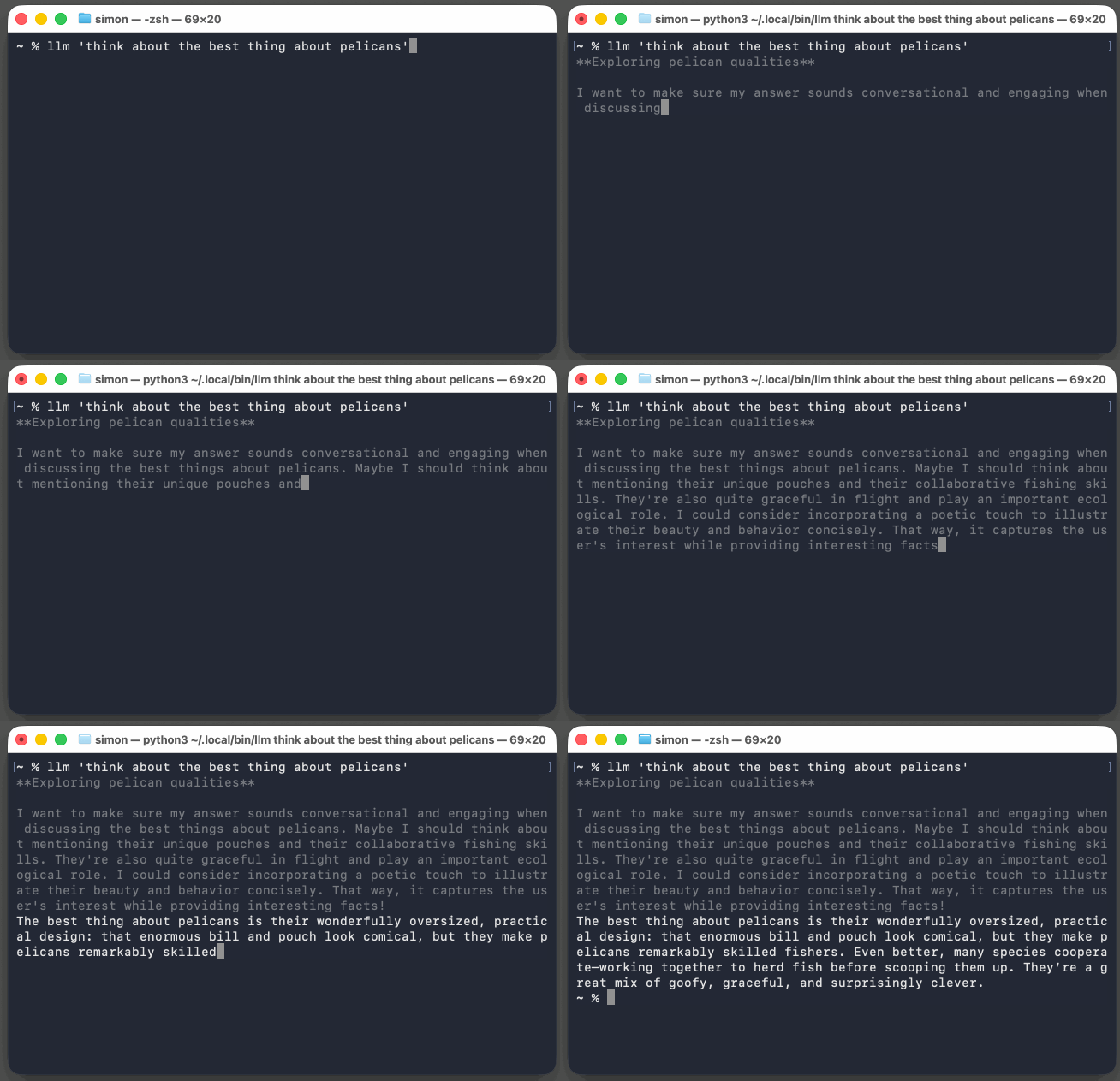
<p>Running LLM against reasoning models now <strong>displays their reasoning traces</strong> to standard error, so you can see what they are "thinking" without that information being included in the standard output that you might pipe to another tool. Add <code>-R/--hide-reasoning</code> to turn this off.</p>
<p><img src="https://static.simonwillison.net/static/2026/best-pelicans.gif" alt="Running llm "think about the best thing about pelicans" in the macOS terminal window - grey text outputs saying Exploring pelican qualities, then after a paragraph of that a white paragraph of text comes out saying: The best thing about pelicans is their wonderfully oversized, practical design: that enormous bill and pouch look comical, but they make pelicans remarkably skilled fishers. Even better, many species cooperate—working together to herd fish before scooping them up. They’re a great mix of goofy, graceful, and surprisingly clever." style="max-width: 100%;" /></p>
<p>LLM includes support out-of-the-box for the <strong>GPT-5.6 model family</strong>, and the new default model used with <code>llm "prompt"</code> is now the inexpensive but capable <strong>GPT-5.6 Luna</strong>.</p>
<p>LLM calls can now use <strong>server-side tools</strong> from various providers. OpenAI provide <a href="https://llm.datasette.io/en/stable/openai-models.html#code-interpreter">a code execution environment</a> as a server-side tool; LLM can now run prompts that benefit from that like so:</p>
<div class="highlight highlight-source-shell"><pre>llm --tool CodeInterpreter <span class="pl-s"><span class="pl-pds">'</span>Show current python and SQLite versions<span class="pl-pds">'</span></span></pre></div>
<p>OpenAI also gets a <a href="https://llm.datasette.io/en/stable/openai-models.html#web-search">WebSearch</a> tool.</p>
<p>The <a href="https://github.com/simonw/llm-anthropic">llm-anthropic</a> plugin adds <a href="https://github.com/simonw/llm-anthropic/blob/0.26/README.md#web-search">WebSearch</a>, <a href="https://github.com/simonw/llm-anthropic/blob/0.26/README.md#web-fetch">WebFetch</a>, <a href="https://github.com/simonw/llm-anthropic/blob/0.26/README.md#code-execution">CodeExecution</a>, and <a href="https://github.com/simonw/llm-anthropic/blob/0.26/README.md#mcp-connector">AnthropicMCP</a>, which looks like this:</p>
<div class="highlight highlight-source-shell"><pre>llm -m claude-sonnet-5 -T <span class="pl-s"><span class="pl-pds">'</span>AnthropicMCP("https://datasette.simonwillison.net/-/mcp")<span class="pl-pds">'</span></span> \
<span class="pl-s"><span class="pl-pds">'</span>how many rows in the blog_blogmark table?<span class="pl-pds">'</span></span></pre></div>
<p>That causes Anthropic to execute MCP calls against my new <a href="https://simonwillison.net/2026/Jul/31/stateless-mcp/#datasette-mcp">datasette-mcp</a> plugin as part of a single request/response interaction with their API.</p>
<p>The new <strong>llm openai endpoint</strong> command provides a tool for <a href="https://llm.datasette.io/en/stable/other-models.html#run-against-an-endpoint-without-configuring-it">executing prompts against <em>any</em> OpenAI compatible endpoint</a> as a one-liner. These aren't logged, which makes this a handy tool for running one-off prompts against anything that speaks the lingua franca of the LLM API world.</p>
<p>Here
分享
阅读原文 ↗