Daily Tech Briefing
AI 科技速览
每天 5 分钟内学习 AI。获取最新的人工智能新闻,理解其重要性,并学习如何将其应用于您的工作。
One Useful Thing · 2026/7/23 18:05:24
An opinionated guide to which AI to use to do stuff
AI 中文解读
AI选型指南又更新了!这篇来自One Useful Thing的文章最吸引人的地方在于:AI已经不再只是聊天机器人,而是进化成了能独立完成几小时工作的“智能体”,而且最新模型之间的差距大得惊人。
过去用AI,就像跟一个聪明的对话框来回聊天;现在不同了,AI直接“拿到”了一台电脑,能自己规划步骤、调用工具、完成任务。文章举了个例子:用旧版GPT-5生成一个城市建造游戏,和用新版GPT-5.6 Sol生成的效果天差地别。那么普通人该怎么选?作者建议:只是问个菜谱、写封短信,免费模型就够用;但如果是医疗或法律这类高风险问题,就得花钱用顶尖模型,比如Claude的Opus或ChatGPT的GPT-5.6 Sol,并把思考等级调到“高”。
对普通人来说,这意味着AI的门槛变低了,但选择变复杂了。想真正干“实事”——比如整理文件、做分析、生成作品——目前最靠谱的就是ChatGPT和Claude,每月20美元起,就能让AI替你操作电脑干活。不过它们文档写得差、名字起得乱,上手还得花点心思。总之,别再以为AI只会聊天,它已经是个能替你加班的数字员工了。
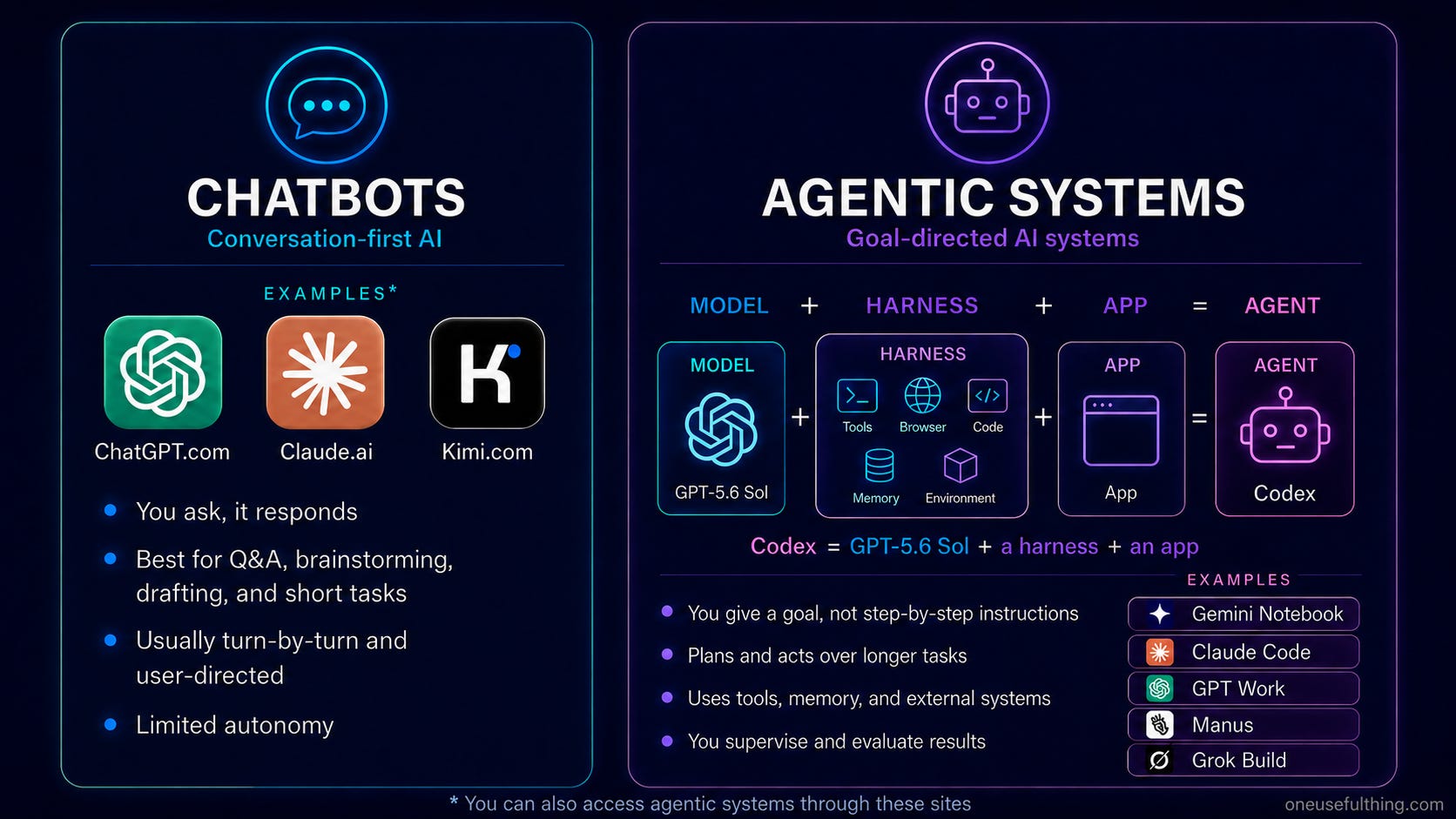
Every few months, I write a guide for people who want to use AI to do stuff. This time, a lot has changed, in part because what it means to “use AI to do stuff” encompasses so much more “stuff” than it used to. Until recently, using AI meant talking to a model through a chatbot in a constant back-and-forth conversation. Now, it means using an agentic system, where the AI is capable of doing the equivalent of many hours of real human work in one go by combining the brains of an AI model with a set of tools that let it plan and act for you. Basically, an agentic system gives an AI a computer to use.If you haven’t used an AI in the last few months, you might be surprised about how much has changed as a result of smarter models and better agentic systems. As a fun example, When GPT-5 came out, I created a brutalist city building game as a demo (you can still play the original version) with the prompt “make a procedural brutalist building creator where i can drag and edit buildings in cool ways, they should look like actual buildings,” and some suggestions for improvement. Less than a year later, I used GPT-5.6 Sol in Codex to do the same thing: you can play it here. If you don’t want to play it, the video shows the difference — it is quite stark!So how do you take advantage of this power? My advice really has two parts. If you just want a chatbot that can give you a recipe, answer a low-stakes question, or help you write a letter, there are now tons of options that are good enough, including the default free models. They are all at least fine when the stakes are low, so pick the one you like. But there is an important caveat: if you are chatting about high-stakes issues, like getting a second opinion on a medical or legal concern, you will want the results to be better than “good enough” advice. For these issues, you will want to use the most advanced models you can get access to, which is either Claude's most powerful models, Opus and Fable, or ChatGPT's GPT-5.6 Sol, set to at least the “High” thinking levels. That is because these models have lower error rates and score much higher on ability tests in complex fields, but they will also cost you some money.You need to pick both an AI model and its thinking level. This chart is a guide to which to select.But what if you want to do real work? There are only two choices for most people who want to get the most out of AI right now: ChatGPT or Claude (I will get to Google later). You can go in other directions and save money, but it will take expertise and know-how, while, starting at $20/month1, Claude and ChatGPT are easy and powerful (but also badly documented and confusingly named). Essentially they give a really good AI access to a computer, and that lets it do real work for you. Giving your AI a computerThere are basically two ways to give Claude or ChatGPT a computer: the AI company can provide a virtual computer for its agent to use, or you can give the AI access to your own. Let’s start with the easier (and less powerful) case. To use the computers provided by the AI companies, the mode you want is called ChatGPT Work in ChatGPT, and Cowork in Claude (the naming will not get less confusing, I am sorry to say). In this mode, you next pick the model and its thinking level — I would start with Sol set to High for ChatGPT, and Fable or Opus set to High for Claude. You can also pick what applications you want the AI to connect to, which lets the AI act on your stuff. Personally, I have the systems connected to my email, a non-private part of my Google Drive, and lots of other applications, but you have to decide what you are comfortable with.Once you are set up, you can do pretty powerful things. For example, I told both systems: “connect to my Gmail and help me prep for the MBA seminar I am giving on Monday the 21st, including building some presentation and demos as inspiration. Answer
分享
阅读原文 ↗