Daily Tech Briefing
AI 科技速览
每天 5 分钟内学习 AI。获取最新的人工智能新闻,理解其重要性,并学习如何将其应用于您的工作。
Hacker News · 2026/8/2 01:35:11
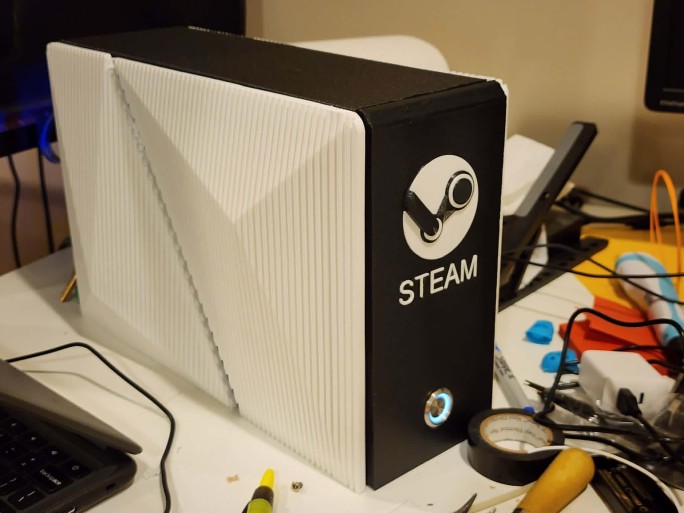
ASRock BC-250: Building the Budget Steam Machine
AI 中文解读
核心亮点:一台价格亲民的迷你电脑,经过简单调校就能变身高性能游戏主机,堪称预算玩家的"装机神器"。
通俗解读:华擎BC-250原本是挖矿用的硬件,但有人发现它玩游戏性价比极高。文章作者分享了完整的"改造秘籍":把显卡专用内存从512MB调到6GB,避免游戏画质模糊;关掉Steam的预下载着色器功能,因为那个缓存和这款硬件不匹配,反而拖慢速度;再给CPU降降压、超超频,相当于让发动机在更低油耗下跑出更高车速。最后还推荐安装一个叫"cyan-skillfish-smu"的小工具,让显卡频率自动调节,既省电又能大幅提升游戏流畅度。
实际影响:对预算有限的玩家来说,这意味着用很低的成本就能组装一台能玩主流游戏的"游戏机"。整个改造过程也像搭积木一样有乐趣,适合喜欢折腾的DIY爱好者。虽然需要动手设置,但作者给出了安全默认参数,照着做就能提升体验。这类产品让更多人用更少钱玩到好游戏,也推动了硬件改造社区的活跃。
HomeBlogProjectsAboutASRock BC250 - Building the Budget Steam MachineJuly 8, 2026My complete guide for setting up the ASRock BC-250. You can’t beat its price for performance, and it’s perfect for those who love projects.TLDR (for those with BC-250 experience):Use 6GB VRAM allocation: it still dynamically allocates, and some games will have terrible texture quality if you use 512MB like everyone recommends. It will take a chunk of your usable system RAM away, but it won’t matter.Disable Steam precached shader downloading: this needs to be recommended more! With it enabled you download a generic shader cache that doesn’t match the BC-250. Every-time you launch your game it will redownload, overwriting any background processed shader cache that the BC-250 generated.Undervolt & overclock CPU: there is no reason not too! With the 40CU unlock, that leaves extra room for CPU overclocking. Try to get 4Ghz if you can, (I can only reach 3.8).Bazzite Users- Disable HHD daemon: causes constant stuttering every couple of seconds. Noticed this issue, when basic 2D games seemed to have consistent lag spikes.For those looking for a full guide, with all the juicy tips and tricks, please continue…HardwareUSB Bluetooth/WiFi AdapterBC-250 printed caseBIOS FlashingVRAM allocation512MB is recommended by most.6GB is my recommendation.Chipset -> Integrated Graphics Controller -> ForcesUMA Mode -> UMA_SPECIFIEDUMA Frame buffer Size -> 6GBCoolingDon’t bother with buying two fans. Only one really makes a difference. See very helpful Reddit post.Artic P12 Pro (recommended)Noctua NF-A12x25 (less pressure than Artics, still do the job perfectly fine tho)Set fan-curve in the bios.SoftwareGPU GovernorOut of the box, the BC250 GPU is locked to 1500MHz. The cyan-skillfish-smu GPU governor allows for dynamically scaling the GPU clock speeds to match demand. Highly recommended for both decreasing idle power usage, and dramatically increasing game performance.InstallationCachy OS installation:yay -S cyan-skillfish-smu
Bazzite installation:sudo dnf copr enable filippor/bazzite
sudo rpm-ostree install cyan-skillfish-governor-smu
systemctl reboot
ConfigurationOnce installed, edit the config file: /etc/cyan-skillfish-smu/config.tomlThese are extremely safe defaults, meant to work on everyone’s BC250. However, there’s a good chance you can squeeze out more performance with less power while also improving your system’s thermals.Frequency Range[frequency-range]
min = 1000 # MHz (350 is the absolute minimum good silicon can go)
max = 1850 # MHz
Begin with updating the frequency-range. The max of 1850 MHz is a sweet spot once you enable the additional GPU CUs (compute units) in the next step. Going beyond it doesn’t improve performance much and only dramatically increases power-draw and heat. If you don’t enable extra CUs, then you’ll need to bump the max MHz to 2000 (safe) and up 2200 MHz if you can. But realistically there is no reason to do this once you enable the additional CUs.We’ll start by lowering the minimum frequency-range. This will improve power-draw on idle and in less-demanding games.
Follow the process below.Keep repeating the below steps until your system becomes unstable and crashes:Decrease minimum frequency-range in increments of 100.Save & exit the config.sudo systemctl restart cyan-skillfish-smuI was lucky enough to have a system stable at 350MHz. But your milage may vary.Load TargetsNext, I like to adjust the load-target values. This is entirely personal preference, feel free to skip. These are percentage values of GPU utilization. Upper defines at which percentage the GPU must be used to clock up. Lower defines the percentage of utilization for clocking down. The defaults are very unwilling to clock down, even in lesser demanding games.# %
[load-target]
upper = 0.65
lower = 0.35 # Default is 0.50
These settings work perfect for me. It cranks the GPU just enough for less demanding games without giving it more power than it needs.Safe-point volt
分享
阅读原文 ↗