Daily Tech Briefing
AI 科技速览
每天 5 分钟内学习 AI。获取最新的人工智能新闻,理解其重要性,并学习如何将其应用于您的工作。
Hacker News · 2026/8/1 19:44:48
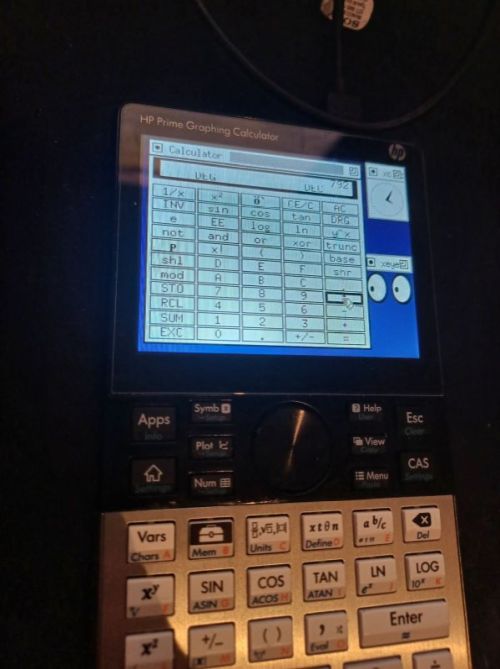
But can your calculator run Linux?
AI 中文解读
【But can your calculator run Linux?】Skip to main content
Raymii.org
אֶשָּׂא עֵינַי אֶל־...
Skip to main content
Raymii.org
אֶשָּׂא עֵינַי אֶל־הֶהָרִים מֵאַיִן יָבֹא עֶזְרִֽי׃
Home |
About |
All pages |
Cluster Status |
RSS Feed
window.addEventListener('DOMContentLoaded', (event) => {
new PagefindUI({ element: "#search" });
});
But can your calculator run Linux?
Published: 01-08-2026 20:08 | Author: Remy van Elst | Text only version of this article
Table of Contents
HP Prime G2
Bow for me for I am root
Hardware specs for a calculator!?
Hardware specs for other calculators
HP Prime G2 Linux
Instructions for running Linux on the HP Prime G2
HP Prime G1 Linux
Windows?!
One of my all time favorite calculators is the HP 16C. It is an RPN calculator aimed at
computer programmers with support for hex, binary, octal and decimal and all
sorts of useful operations like bit shifting, masking and rotations. I don't
own one myself, I have a Swiss Micro's DM16L, a high quality modern day
remake with improvements like a 2 line display. There is a limited run
collectors edition of the HP 16C coming soon though.
But none of those calculators run Linux.
This one can:
xcalc on an actual calculator
Screenshot of the console and partial fbv image viewer
Of course it runs Doom
My all time favorite, the HP-16C
Below are at least a thousand words covering the HP Prime G2 and other
graphical calculators capable of running Linux. You can skip that if you just want to read about my updated Linux port for the Prime
G2.
HP Prime G2
The HP Prime is a graphing
calculator on the market since 2013, with a hardware revision in 2018 (the G2
model). It has a touch screen and as far as I can find, most people
are happy with it
and find it a very capable
and fast calculator. Here are some
pictures of the opened up calculator and here is a website with some more
downloads.
I'm not really interested in the calculator part. For most calculations
I do for my day job, embedded programming, the HP-16C is a better fit. I was
interested in this device because I found posts online suggesting it could
run Linux and even a Windows 10 port.
Bow for me for I am root
I do have a history running Linux on older HP devices
and I do like to have full privilege on all devices I own. Back then I
wrote:
I have a rule that I try to adhere to for devices I own. They must allow a
means of root or administrative actions. The Nintendo Switch I got second
hand is old enough to be jailbroken. The two Apple devices I own (a first
gen iPad Air and first-gen iPhone SE) have vulnerabilities that give me
root access. All Android phones I owned I've specifically bought because
the bootloader can be unlocked. Once I buy a device, it is mine and I
decide what to do with it. Not the manufacturer. Otherwise it is e-waste
the moment it leaves the factory.
Being able to develop software on a device is almost a must have as well for
me. Missing functionality, otherwise known as stuff the manufacturer does
not make (enough) money on, can be programmed back in as long as you can
develop on a device and are willing to put in enough time and/or money.
Now with a calculator that isn't a huge issue since I don't see them as
general purpose computing devices. Although Texas Instruments did later on
removed and restricted features that their device shipped with initially,
namely running assembly code on your calculator
and Numworks also locked down their calculators. That all has to do with
cheating and exam mode, so I do understand that part. If your device is not
allowed on
分享
阅读原文 ↗