Daily Tech Briefing
AI 科技速览
每天 5 分钟内学习 AI。获取最新的人工智能新闻,理解其重要性,并学习如何将其应用于您的工作。
AWS ML Blog · 2026/7/29 16:20:28
Authenticate with Private Key JWT using Amazon Bedrock AgentCore Identity
AI 中文解读
亚马逊Bedrock AgentCore身份验证现在支持一种更安全的“私钥JWT”认证方式。简单来说,就是AI代理不再需要记住一个固定的共享密码,而是可以生成一张加密的“数字身份证”去证明自己的身份,私钥保存在AWS的专用保险柜里,别人偷不走。
过去,AI应用调用企业后台API时常常要共享一个“暗号”(客户端密钥),一旦泄露就容易出问题。现在这种做法升级了:企业先在身份提供商那里登记一个公开钥匙,自己的私钥则始终锁在AWS KMS里。每次AI代理请求令牌时,系统会自动用KMS给数字签名盖上章,身份提供商只需用公开钥匙验证一下就能放行,私钥全程不接触网络。整个过程支持RS256、PS256等签名算法,也兼容标准的客户端凭证授权流程。
对于普通用户来说,这意味着使用AI客服、智能助手时,后台的数据访问会更加安全,别人更难冒充系统窃取你的订单记录、个人信息。企业开发者也不用再担心密钥被截获,配置起来依然很简单,直接在管理台上传公钥、设置KMS密钥和签名算法即可。同时,所有访问都会有CloudTrail日志可追溯,出了故障能更快定位问题。这项改进让AI与企业内部系统对接时既高效又可靠,用户体验更安心。
<p><a href="https://aws.amazon.com/bedrock/agentcore/" target="_blank" rel="noopener">Amazon Bedrock AgentCore Identity</a> now supports Private Key JWT client authentication for agents. With Private Key JWT client authentication, your agents can authenticate to a downstream identity provider’s token endpoint using a signed JSON Web Token (JWT) client assertion instead of a shared OAuth 2.0 client secret. You can register a public key with your identity provider, while the corresponding private key stays in an <a href="https://aws.amazon.com/kms/" target="_blank" rel="noopener">AWS Key Management Service</a> (AWS KMS). To authenticate, <a href="https://docs.aws.amazon.com/bedrock-agentcore/latest/devguide/identity.html" target="_blank" rel="noopener">AgentCore Identity</a> uses AWS KMS to sign the assertion and sends the signed assertion to the identity provider, which verifies it using the public key you registered.</p>
<p>This post explains how Private Key JWT client authentication works in AgentCore Identity and reviews the supported grant flows. We then walk through creating an AWS KMS signing key, registering its public key with your identity provider, configuring a credential provider on the AWS Management Console, and reviewing example AWS CloudTrail events that record your agent’s access.</p>
<h2 id="how-does-it-work">How does it work?</h2>
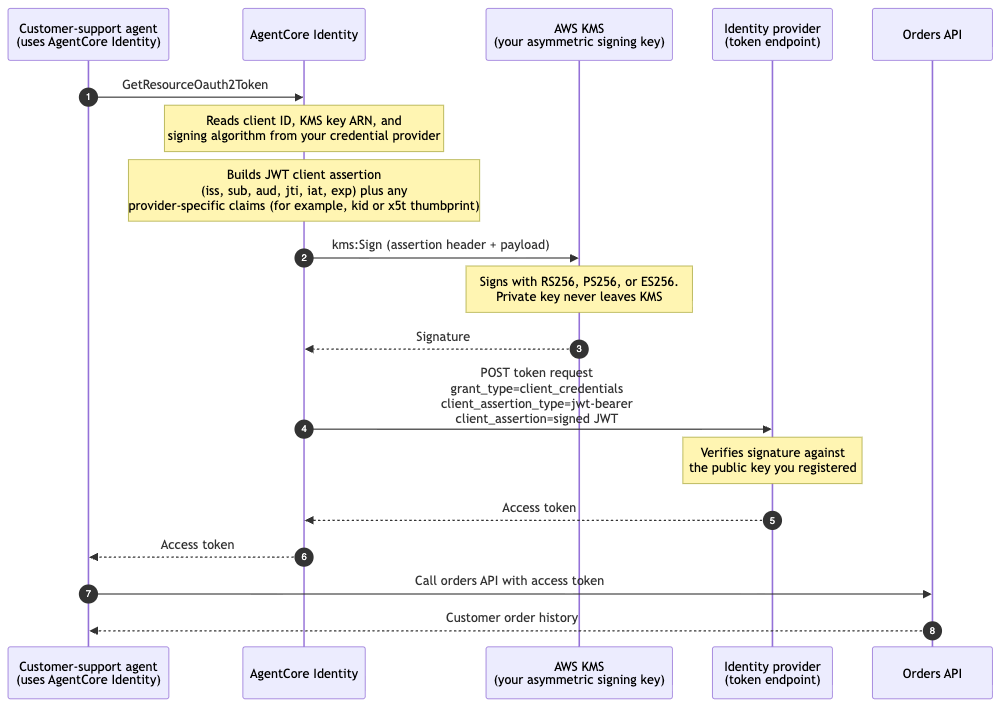
<p>The following example illustrates the request flow. Consider a customer-support agent that needs to read a customer’s order history from an internal orders API protected by your identity provider.</p>
<p><img src="https://d2908q01vomqb2.cloudfront.net/f1f836cb4ea6efb2a0b1b99f41ad8b103eff4b59/2026/07/28/ML-21480-1.png" alt="Request flow showing the agent calling AgentCore Identity, which signs a JWT with KMS, posts the assertion to the identity provider, and returns an access token to the agent" width="800"></p>
<p><em>Figure 1 – Example request flow for a machine-to-machine token request, from the agent’s call through to the downstream API</em></p>
<p>The following diagram illustrates the request flow:</p>
<ol type="1">
<li>The agent calls <code>GetResourceOauth2Token</code> on AgentCore Identity to request a token for the orders API.</li>
<li>AgentCore Identity reads the client ID, KMS key ARN, and signing algorithm from your credential provider. It builds a short-lived JWT client assertion with the required payload claims (plus any additional header or payload claims you configured, such as a key identifier or a certificate thumbprint), and calls <code>kms:Sign</code> against your KMS asymmetric signing key using the signing algorithm you configured (RS256, PS256, or ES256).</li>
<li>AWS KMS signs the assertion and returns the signature to AgentCore Identity. The private key never leaves KMS.</li>
<li>AgentCore Identity posts the signed assertion to your identity provider’s token endpoint with <code>grant_type=client_credentials</code> and <code>client_assertion_type=urn:ietf:params:oauth:client-assertion-type:jwt-bearer</code>.</li>
<li>The identity provider verifies the signature against the public key you registered and returns an access token to AgentCore Identity.</li>
<li>AgentCore Identity returns the access token to your agent.</li>
<li>The agent calls the orders API with the access token.</li>
<li>The orders API returns the customer’s order history.</li>
</ol>
<h2 id="overview-of-supported-grant-flows">Overview of supported grant flows</h2>
<p>Private Key JWT authentication works for the three grant flows:</p>
<ul>
<li><strong>Machine-to-machine (M2M)</strong>: the agent acts as itself. There is no human user in the picture. The agent needs to access a resource, for example a background job syncing data, or a service that any customer-support agent can read regardless of who triggered it. The token represents the application/agent identity. Uses the client_credentials grant. The token’s subject is the client itself.</li>
<li><strong>On-be
分享
阅读原文 ↗