Daily Tech Briefing
AI 科技速览
每天 5 分钟内学习 AI。获取最新的人工智能新闻,理解其重要性,并学习如何将其应用于您的工作。
AWS ML Blog · 2026/7/23 16:38:34
Detecting silent agent failures with Amazon Bedrock AgentCore optimization
AI 中文解读
亚马逊云推出了一项名为AgentCore优化新功能,专门用来揪出那些表面运行正常、实际却在“偷偷犯错”的AI代理。核心亮点是:它能发现那些系统显示一切健康、但客户投诉却不断涌现的隐形故障。
通俗来说,很多AI助手在处理订单、查询库存等任务时,可能系统显示完成了,但结果却是错的——比如没修改订单、把缺货说成有货。传统监控工具只看代码有没有报错、响应快不快,发现不了这类“行为失败”。AgentCore优化通过分析AI执行任务的全程记录,自动找出是哪种错误模式最常出现、影响范围多大、根本原因是什么,然后按严重程度排序,帮你优先修复最关键的问题。
这项技术直接影响企业使用AI客户服务的质量。以前客服系统出错,客户抱怨后技术人员才去查,往往已经影响了成百上千人。现在AgentCore能主动预警,让企业第一时间修复隐形错误,从而减少订单出错、信息不准带来的麻烦,用户日常使用AI服务也会更靠谱、更省心。
<p>If you’re operating AI agents at scale, Amazon Bedrock AgentCore surfaces a category of insights you’ve probably experienced but struggle to detect: your dashboards show green across the board. 99% completion rate, healthy latency, zero error spikes. And yet customer complaints trickle in about incorrect outcomes.</p>
<p>An order modification that was never actually executed. A product reported as “in stock” when the inventory API timed out. An approval step that was skipped. These are behavioral failures, and they look different from infrastructure issues. They complete successfully from the system’s perspective. They pass health checks and only surface through customer escalations, often weeks after they began affecting users at scale.</p>
<p>Even for failures that do produce error signals, a separate challenge exists: when an agent serving thousands of daily sessions accumulates hundreds of errors, which ones deserve attention first? Reviewing individual traces reveals what happened in a single session. But it tells you little about whether you’re looking at a pattern affecting 30% of traffic or an edge case affecting three sessions.</p>
<p><strong>Amazon Bedrock AgentCore optimization</strong> provides <strong>insights</strong> that help you discover, explain, and prioritize behavioral failures in your deployed AI agents, including the silent ones that never generate an error signal. These insights shift the observability model from reactive trace inspection to proactive pattern detection. It helps you find the failures, understand their scope, and fix them in priority order. In this post, we walk through how insights in AgentCore optimization works, how to set it up, and what it reveals when pointed at a real agent.</p>
<h2 id="what-insights-in-amazon-bedrock-agentcore-optimization-delivers">What insights in Amazon Bedrock AgentCore optimization delivers</h2>
<p>Insights operate one layer above your existing observability stack. It consumes the trace data your tools already collect and transforms it into actionable behavioral intelligence. This provides an investigation capability that helps you understand broader patterns affecting agent performance at scale, beyond individual session failures.</p>
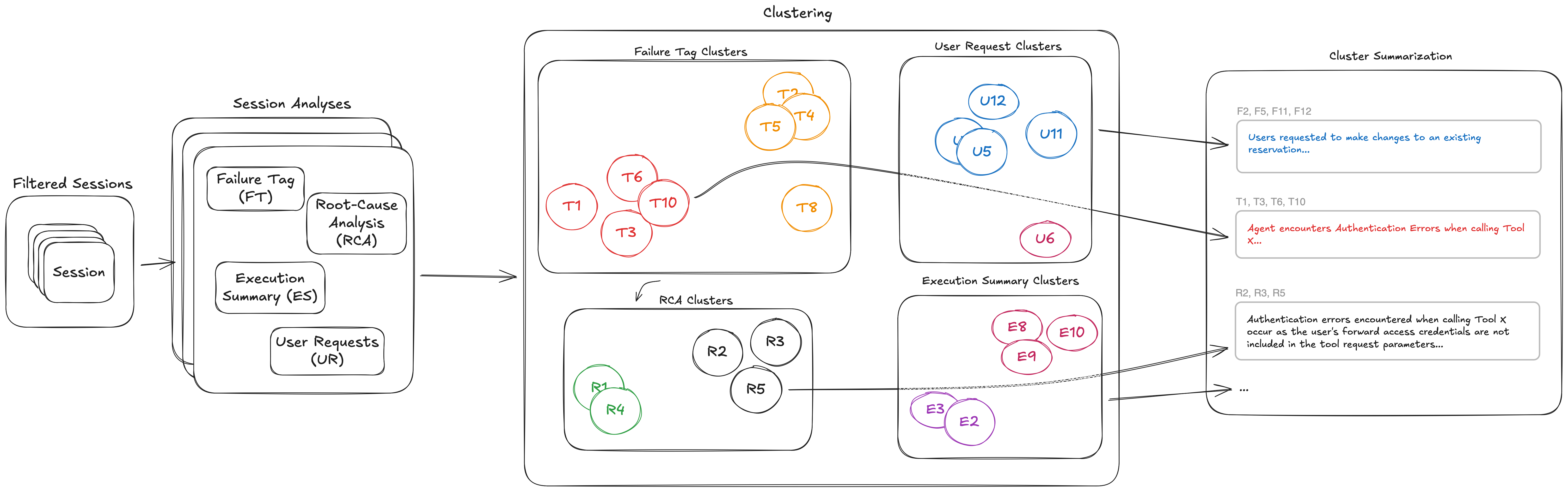
<p>The following figure shows the end-to-end analysis performed by AgentCore to deliver insights. Each session analysis method extracts one or more attributes from each session. The attributes from each session analysis method are clustered independently. Each cluster is summarized to enhance interpretability.</p>
<p><img src="https://d2908q01vomqb2.cloudfront.net/f1f836cb4ea6efb2a0b1b99f41ad8b103eff4b59/2026/07/22/ML-21350-1.png" alt="End-to-end AgentCore insights analysis pipeline: each session analysis method extracts attributes that are clustered independently and summarized" width="800"></p>
<p>The insights report surfaces the following:</p>
<ul>
<li><strong>Ranked failure pattern discovery with root cause analysis</strong>.<br> Surfaces ranked clusters across hundreds of sessions without requiring predefined categories or filters. One aggregate explanation per cluster covering affected sessions, specific enough to act on without opening individual traces. Patterns are ordered by proportion of sessions affected, so a pertinent issue is immediately distinguishable from an edge case. Without this, developers triage errors by gut feel and cannot distinguish a systematic issue without manually reviewing hundreds of traces.</li>
</ul>
<ul>
<li><strong>User intent analysis</strong>.<br> Reveals how users interact with the agent across different scenarios. Agents in production often receive requests that diverge from their intended design. Intent analysis shows you the actual distribution of what users ask for. It surfaces coverage gaps to address and scope boundaries to enforce, without requiring you to instrument anything beyond the traces you already collect.</li>
</ul>
<ul>
<li><strong>Execution insight
分享
阅读原文 ↗